ML 管线
\[ \newcommand{\R}{\mathbb{R}} \newcommand{\E}{\mathbb{E}} \newcommand{\x}{\mathbf{x}} \newcommand{\y}{\mathbf{y}} \newcommand{\wv}{\mathbf{w}} \newcommand{\av}{\mathbf{\alpha}} \newcommand{\bv}{\mathbf{b}} \newcommand{\N}{\mathbb{N}} \newcommand{\id}{\mathbf{I}} \newcommand{\ind}{\mathbf{1}} \newcommand{\0}{\mathbf{0}} \newcommand{\unit}{\mathbf{e}} \newcommand{\one}{\mathbf{1}} \newcommand{\zero}{\mathbf{0}} \]
本节介绍 ML 管线 的概念。ML 管线提供了一套统一的高级 API,构建在 DataFrame 之上,帮助用户创建和调优实用的机器学习管线。
目录
管线中的主要概念
MLlib 将机器学习算法的 API 标准化,使得将多个算法组合成单个管线或工作流变得更加容易。本节涵盖了管线 API 引入的关键概念,其中管线概念主要受到 scikit-learn 项目的启发。
-
DataFrame:此 ML API 使用 Spark SQL 的DataFrame作为 ML 数据集,可以容纳各种数据类型。例如,一个DataFrame可以包含存储文本、特征向量、真实标签和预测的不同列。 -
Transformer(转换器):Transformer是一种算法,可以将一个DataFrame转换为另一个DataFrame。例如,ML 模型就是一个Transformer,它将带有特征的DataFrame转换为带有预测的DataFrame。 -
Estimator(估计器):Estimator是一种算法,可以对DataFrame进行拟合以生成Transformer。例如,像学习算法就是一个Estimator,它在DataFrame上进行训练并生成模型。 -
Pipeline(管线):Pipeline将多个Transformer和Estimator链接在一起,以指定一个 ML 工作流。 -
Parameter(参数):所有Transformer和Estimator现在都共享一个用于指定参数的通用 API。
DataFrame
机器学习可以应用于各种数据类型,例如向量、文本、图像和结构化数据。此 API 采用 Spark SQL 的 DataFrame 以支持各种数据类型。
DataFrame 支持多种基本类型和结构化类型;有关支持类型的列表,请参阅 Spark SQL 数据类型参考。除了 Spark SQL 指南中列出的类型外,DataFrame 还可以使用 ML Vector 类型。
DataFrame 可以从常规 RDD 隐式或显式创建。有关示例,请参阅下面的代码示例和 Spark SQL 编程指南。
DataFrame 中的列是命名的。下面的代码示例使用诸如“text”、“features”和“label”之类的名称。
管线组件
转换器
一个 Transformer 是一种抽象,包括特征转换器和学习模型。从技术上讲,一个 Transformer 实现了一个 transform() 方法,该方法将一个 DataFrame 转换为另一个,通常通过附加一个或多个列。例如
- 特征转换器可能会接收一个
DataFrame,读取一列(例如,文本),将其映射到一个新列(例如,特征向量),并输出一个附加了映射列的新DataFrame。 - 学习模型可能会接收一个
DataFrame,读取包含特征向量的列,预测每个特征向量的标签,并输出一个附加了预测标签作为列的新DataFrame。
估计器
一个 Estimator 抽象了学习算法或任何在数据上拟合或训练的算法的概念。从技术上讲,一个 Estimator 实现了一个 fit() 方法,该方法接受一个 DataFrame 并生成一个 Model,而 Model 又是一个 Transformer。例如,像 LogisticRegression 这样的学习算法是一个 Estimator,调用 fit() 会训练一个 LogisticRegressionModel,它是一个 Model,因此也是一个 Transformer。
管线组件的属性
Transformer.transform() 和 Estimator.fit() 都是无状态的。将来,有状态算法可能会通过其他概念得到支持。
Transformer 或 Estimator 的每个实例都有一个唯一 ID,这在指定参数(下文讨论)时很有用。
管线
在机器学习中,通常会运行一系列算法来处理和学习数据。例如,一个简单的文本文档处理工作流可能包含几个阶段
- 将每个文档的文本分割成单词。
- 将每个文档的单词转换为数值特征向量。
- 使用特征向量和标签学习预测模型。
MLlib 将此类工作流表示为 Pipeline(管线),它由一系列按特定顺序运行的 PipelineStage(Transformer 和 Estimator)组成。在本节中,我们将使用这个简单的工作流作为运行示例。
工作原理
一个 Pipeline 被指定为一个阶段序列,每个阶段要么是 Transformer,要么是 Estimator。这些阶段按顺序运行,输入 DataFrame 在通过每个阶段时都会被转换。对于 Transformer 阶段,会在 DataFrame 上调用 transform() 方法。对于 Estimator 阶段,会调用 fit() 方法来生成一个 Transformer(它成为 PipelineModel 或已拟合 Pipeline 的一部分),然后该 Transformer 的 transform() 方法会在 DataFrame 上调用。
我们以简单的文本文档工作流为例进行说明。下图显示了 Pipeline 在 *训练时*的用法。
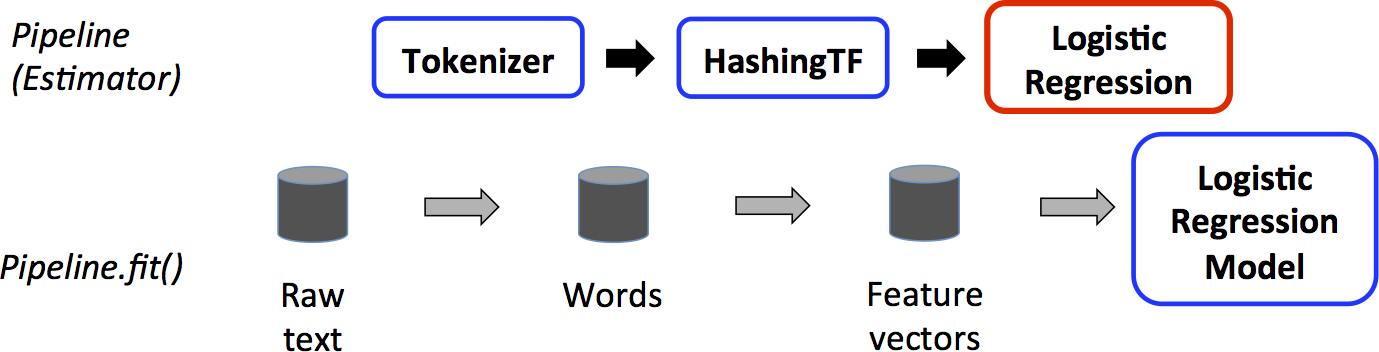
在上图中,顶行表示一个包含三个阶段的 Pipeline。前两个(Tokenizer 和 HashingTF)是 Transformer(蓝色),第三个(LogisticRegression)是 Estimator(红色)。底行表示数据流经管线,其中圆柱体表示 DataFrame。在原始 DataFrame 上调用 Pipeline.fit() 方法,该 DataFrame 包含原始文本文档和标签。Tokenizer.transform() 方法将原始文本文档分割成单词,并向 DataFrame 添加一个包含单词的新列。HashingTF.transform() 方法将单词列转换为特征向量,并向 DataFrame 添加一个包含这些向量的新列。现在,由于 LogisticRegression 是一个 Estimator,Pipeline 首先调用 LogisticRegression.fit() 来生成一个 LogisticRegressionModel。如果 Pipeline 有更多的 Estimator,它会在将 DataFrame 传递到下一个阶段之前,对 DataFrame 调用 LogisticRegressionModel 的 transform() 方法。
一个 Pipeline 是一个 Estimator。因此,在 Pipeline 的 fit() 方法运行后,它会生成一个 PipelineModel,它是一个 Transformer。这个 PipelineModel 在 *测试时* 使用;下图说明了这种用法。
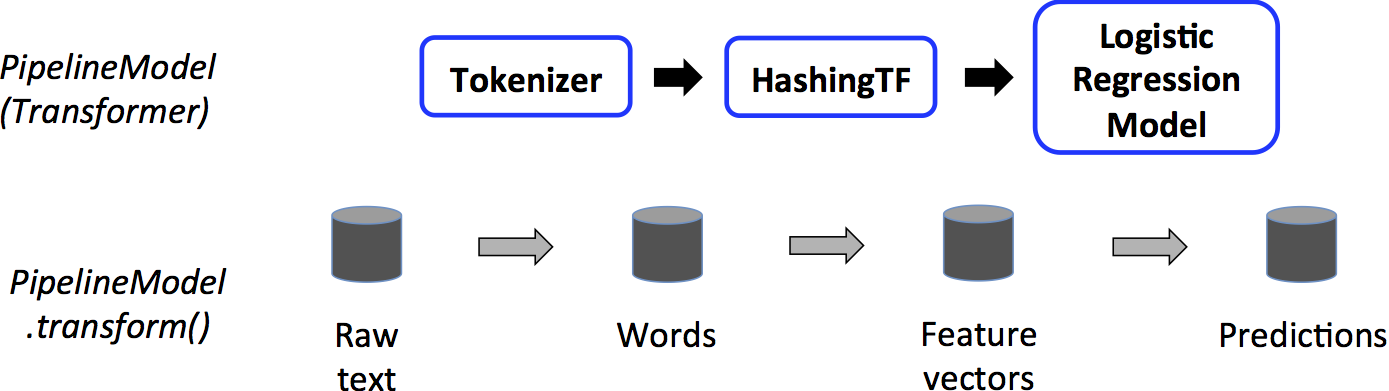
在上图中,PipelineModel 具有与原始 Pipeline 相同数量的阶段,但原始 Pipeline 中的所有 Estimator 都已变为 Transformer。当在测试数据集上调用 PipelineModel 的 transform() 方法时,数据会按顺序通过已拟合的管线。每个阶段的 transform() 方法都会更新数据集并将其传递到下一个阶段。
Pipeline 和 PipelineModel 有助于确保训练数据和测试数据通过相同的特征处理步骤。
详情
DAG Pipelines:Pipeline 的阶段被指定为一个有序数组。这里给出的示例都是线性 Pipeline,即每个阶段都使用前一阶段生成的数据的 Pipeline。只要数据流图形成有向无环图 (DAG),就可以创建非线性 Pipeline。此图目前根据每个阶段的输入和输出列名称(通常指定为参数)隐式指定。如果 Pipeline 形成 DAG,则阶段必须按拓扑顺序指定。
运行时检查:由于 Pipelines 可以处理不同类型的 DataFrames,它们无法使用编译时类型检查。Pipeline 和 PipelineModel 改为在实际运行 Pipeline 之前进行运行时检查。此类型检查是使用 DataFrame *schema*(DataFrame 中列数据类型的描述)完成的。
唯一的 Pipeline 阶段:Pipeline 的阶段应该是唯一的实例。例如,相同的实例 myHashingTF 不应两次插入到 Pipeline 中,因为 Pipeline 阶段必须具有唯一的 ID。但是,不同的实例 myHashingTF1 和 myHashingTF2(都属于 HashingTF 类型)可以放入同一个 Pipeline 中,因为不同的实例将使用不同的 ID 创建。
参数
MLlib 的 Estimator 和 Transformer 使用统一的 API 来指定参数。
一个 Param 是一个命名的参数,包含自说明文档。ParamMap 是一组(参数,值)对。
有两种主要方式可以将参数传递给算法
- 为实例设置参数。例如,如果
lr是LogisticRegression的一个实例,可以调用lr.setMaxIter(10)使lr.fit()最多使用 10 次迭代。此 API 类似于spark.mllib包中使用的 API。 - 将
ParamMap传递给fit()或transform()。ParamMap中的任何参数都将覆盖之前通过 setter 方法指定的参数。
参数属于 Estimator 和 Transformer 的特定实例。例如,如果我们有两个 LogisticRegression 实例 lr1 和 lr2,那么我们可以构建一个 ParamMap,其中指定了两个 maxIter 参数:ParamMap(lr1.maxIter -> 10, lr2.maxIter -> 20)。这在 Pipeline 中有两个具有 maxIter 参数的算法时很有用。
ML 持久化:保存和加载管线
通常值得将模型或管线保存到磁盘以供以后使用。在 Spark 1.6 中,Pipeline API 中增加了模型导入/导出功能。从 Spark 2.3 开始,spark.ml 和 pyspark.ml 中的基于 DataFrame 的 API 已完全覆盖。
ML 持久化在 Scala、Java 和 Python 中均可使用。但是,R 目前使用修改过的格式,因此在 R 中保存的模型只能在 R 中加载回来;这应该在将来修复,并已在 SPARK-15572 中跟踪。
ML 持久化的向后兼容性
通常,MLlib 保持 ML 持久化的向后兼容性。即,如果您在某个 Spark 版本中保存了 ML 模型或 Pipeline,那么您应该能够在未来的 Spark 版本中加载并使用它。但是,也有一些罕见的例外情况,如下所述。
模型持久化:使用 Apache Spark ML 持久化在 Spark 版本 X 中保存的模型或 Pipeline 是否可以通过 Spark 版本 Y 加载?
- 主要版本:不保证,但会尽力而为。
- 次要版本和补丁版本:是;这些是向后兼容的。
- 关于格式的注意事项:不保证稳定的持久化格式,但模型加载本身被设计为向后兼容。
模型行为:Spark 版本 X 中的模型或 Pipeline 在 Spark 版本 Y 中是否行为一致?
- 主要版本:不保证,但会尽力而为。
- 次要版本和补丁版本:行为一致,除了错误修复。
对于模型持久化和模型行为,任何跨次要版本或补丁版本的破坏性更改都会在 Spark 版本发行说明中报告。如果发行说明中未报告破坏,则应将其视为需要修复的错误。
代码示例
本节提供了代码示例,说明了上面讨论的功能。有关更多信息,请参阅 API 文档(Python、Scala 和 Java)。
示例:估计器、转换器和参数
此示例涵盖了 Estimator、Transformer 和 Param 的概念。
有关 API 的更多详细信息,请参阅 Estimator Python 文档、Transformer Python 文档 和 Params Python 文档。
from pyspark.ml.linalg import Vectors
from pyspark.ml.classification import LogisticRegression

# Prepare training data from a list of (label, features) tuples.
training = spark.createDataFrame([
    (1.0, Vectors.dense([0.0, 1.1, 0.1])),
    (0.0, Vectors.dense([2.0, 1.0, -1.0])),
    (0.0, Vectors.dense([2.0, 1.3, 1.0])),
    (1.0, Vectors.dense([0.0, 1.2, -0.5]))], ["label", "features"])

# Create a LogisticRegression instance. This instance is an Estimator.
lr = LogisticRegression(maxIter=10, regParam=0.01)
# Print out the parameters, documentation, and any default values.
print("LogisticRegression parameters:\n" + lr.explainParams() + "\n")

# Learn a LogisticRegression model. This uses the parameters stored in lr.
model1 = lr.fit(training)

# Since model1 is a Model (i.e., a transformer produced by an Estimator),
# we can view the parameters it used during fit().
# This prints the parameter (name: value) pairs, where names are unique IDs for this
# LogisticRegression instance.
print("Model 1 was fit using parameters: ")
print(model1.extractParamMap())

# We may alternatively specify parameters using a Python dictionary as a paramMap
paramMap = {lr.maxIter: 20}
paramMap[lr.maxIter] = 30  # Specify 1 Param, overwriting the original maxIter.
# Specify multiple Params.
paramMap.update({lr.regParam: 0.1, lr.threshold: 0.55})  # type: ignore

# You can combine paramMaps, which are python dictionaries.
# Change output column name
paramMap2 = {lr.probabilityCol: "myProbability"}
paramMapCombined = paramMap.copy()
paramMapCombined.update(paramMap2)  # type: ignore

# Now learn a new model using the paramMapCombined parameters.
# paramMapCombined overrides all parameters set earlier via lr.set* methods.
model2 = lr.fit(training, paramMapCombined)
print("Model 2 was fit using parameters: ")
print(model2.extractParamMap())

# Prepare test data
test = spark.createDataFrame([
    (1.0, Vectors.dense([-1.0, 1.5, 1.3])),
    (0.0, Vectors.dense([3.0, 2.0, -0.1])),
    (1.0, Vectors.dense([0.0, 2.2, -1.5]))], ["label", "features"])

# Make predictions on test data using the Transformer.transform() method.
# LogisticRegression.transform will only use the 'features' column.
# Note that model2.transform() outputs a "myProbability" column instead of the usual
# 'probability' column since we renamed the lr.probabilityCol parameter previously.
prediction = model2.transform(test)
result = prediction.select("features", "label", "myProbability", "prediction") \
    .collect()

for row in result:
    print("features=%s, label=%s -> prob=%s, prediction=%s"
% (row.features, row.label, row.myProbability, row.prediction))有关 API 的详细信息,请参阅 Estimator Scala 文档、Transformer Scala 文档 和 Params Scala 文档。
import org.apache.spark.ml.classification.LogisticRegression
import org.apache.spark.ml.linalg.{Vector, Vectors}
import org.apache.spark.ml.param.ParamMap
import org.apache.spark.sql.Row

// Prepare training data from a list of (label, features) tuples.
val training = spark.createDataFrame(Seq(
  (1.0, Vectors.dense(0.0, 1.1, 0.1)),
  (0.0, Vectors.dense(2.0, 1.0, -1.0)),
  (0.0, Vectors.dense(2.0, 1.3, 1.0)),
  (1.0, Vectors.dense(0.0, 1.2, -0.5))
)).toDF("label", "features")

// Create a LogisticRegression instance. This instance is an Estimator.
val lr = new LogisticRegression()
// Print out the parameters, documentation, and any default values.
println(s"LogisticRegression parameters:\n ${lr.explainParams()}\n")

// We may set parameters using setter methods.
lr.setMaxIter(10)
  .setRegParam(0.01)

// Learn a LogisticRegression model. This uses the parameters stored in lr.
val model1 = lr.fit(training)
// Since model1 is a Model (i.e., a Transformer produced by an Estimator),
// we can view the parameters it used during fit().
// This prints the parameter (name: value) pairs, where names are unique IDs for this
// LogisticRegression instance.
println(s"Model 1 was fit using parameters: ${model1.parent.extractParamMap()}")

// We may alternatively specify parameters using a ParamMap,
// which supports several methods for specifying parameters.
val paramMap = ParamMap(lr.maxIter -> 20)
  .put(lr.maxIter, 30)  // Specify 1 Param. This overwrites the original maxIter.
  .put(lr.regParam -> 0.1, lr.threshold -> 0.55)  // Specify multiple Params.

// One can also combine ParamMaps.
val paramMap2 = ParamMap(lr.probabilityCol -> "myProbability")  // Change output column name.
val paramMapCombined = paramMap ++ paramMap2

// Now learn a new model using the paramMapCombined parameters.
// paramMapCombined overrides all parameters set earlier via lr.set* methods.
val model2 = lr.fit(training, paramMapCombined)
println(s"Model 2 was fit using parameters: ${model2.parent.extractParamMap()}")

// Prepare test data.
val test = spark.createDataFrame(Seq(
  (1.0, Vectors.dense(-1.0, 1.5, 1.3)),
  (0.0, Vectors.dense(3.0, 2.0, -0.1)),
  (1.0, Vectors.dense(0.0, 2.2, -1.5))
)).toDF("label", "features")

// Make predictions on test data using the Transformer.transform() method.
// LogisticRegression.transform will only use the 'features' column.
// Note that model2.transform() outputs a 'myProbability' column instead of the usual
// 'probability' column since we renamed the lr.probabilityCol parameter previously.
model2.transform(test)
  .select("features", "label", "myProbability", "prediction")
  .collect()
  .foreach { case Row(features: Vector, label: Double, prob: Vector, prediction: Double) =>
    println(s"($features, $label) -> prob=$prob, prediction=$prediction")
}有关 API 的详细信息,请参阅 Estimator Java 文档、Transformer Java 文档 和 Params Java 文档。
import java.util.Arrays;
import java.util.List;

import org.apache.spark.ml.classification.LogisticRegression;
import org.apache.spark.ml.classification.LogisticRegressionModel;
import org.apache.spark.ml.linalg.VectorUDT;
import org.apache.spark.ml.linalg.Vectors;
import org.apache.spark.ml.param.ParamMap;
import org.apache.spark.sql.Dataset;
import org.apache.spark.sql.Row;
import org.apache.spark.sql.RowFactory;
import org.apache.spark.sql.types.DataTypes;
import org.apache.spark.sql.types.Metadata;
import org.apache.spark.sql.types.StructField;
import org.apache.spark.sql.types.StructType;

// Prepare training data.
List<Row> dataTraining = Arrays.asList(
    RowFactory.create(1.0, Vectors.dense(0.0, 1.1, 0.1)),
    RowFactory.create(0.0, Vectors.dense(2.0, 1.0, -1.0)),
    RowFactory.create(0.0, Vectors.dense(2.0, 1.3, 1.0)),
    RowFactory.create(1.0, Vectors.dense(0.0, 1.2, -0.5))
);
StructType schema = new StructType(new StructField[]{
    new StructField("label", DataTypes.DoubleType, false, Metadata.empty()),
    new StructField("features", new VectorUDT(), false, Metadata.empty())
});
Dataset<Row> training = spark.createDataFrame(dataTraining, schema);

// Create a LogisticRegression instance. This instance is an Estimator.
LogisticRegression lr = new LogisticRegression();
// Print out the parameters, documentation, and any default values.
System.out.println("LogisticRegression parameters:\n" + lr.explainParams() + "\n");

// We may set parameters using setter methods.
lr.setMaxIter(10).setRegParam(0.01);

// Learn a LogisticRegression model. This uses the parameters stored in lr.
LogisticRegressionModel model1 = lr.fit(training);
// Since model1 is a Model (i.e., a Transformer produced by an Estimator),
// we can view the parameters it used during fit().
// This prints the parameter (name: value) pairs, where names are unique IDs for this
// LogisticRegression instance.
System.out.println("Model 1 was fit using parameters: " + model1.parent().extractParamMap());

// We may alternatively specify parameters using a ParamMap.
ParamMap paramMap = new ParamMap()
  .put(lr.maxIter().w(20))  // Specify 1 Param.
  .put(lr.maxIter(), 30)  // This overwrites the original maxIter.
  .put(lr.regParam().w(0.1), lr.threshold().w(0.55));  // Specify multiple Params.

// One can also combine ParamMaps.
ParamMap paramMap2 = new ParamMap()
  .put(lr.probabilityCol().w("myProbability"));  // Change output column name
ParamMap paramMapCombined = paramMap.$plus$plus(paramMap2);

// Now learn a new model using the paramMapCombined parameters.
// paramMapCombined overrides all parameters set earlier via lr.set* methods.
LogisticRegressionModel model2 = lr.fit(training, paramMapCombined);
System.out.println("Model 2 was fit using parameters: " + model2.parent().extractParamMap());

// Prepare test documents.
List<Row> dataTest = Arrays.asList(
    RowFactory.create(1.0, Vectors.dense(-1.0, 1.5, 1.3)),
    RowFactory.create(0.0, Vectors.dense(3.0, 2.0, -0.1)),
    RowFactory.create(1.0, Vectors.dense(0.0, 2.2, -1.5))
);
Dataset<Row> test = spark.createDataFrame(dataTest, schema);

// Make predictions on test documents using the Transformer.transform() method.
// LogisticRegression.transform will only use the 'features' column.
// Note that model2.transform() outputs a 'myProbability' column instead of the usual
// 'probability' column since we renamed the lr.probabilityCol parameter previously.
Dataset<Row> results = model2.transform(test);
Dataset<Row> rows = results.select("features", "label", "myProbability", "prediction");
for (Row r: rows.collectAsList()) {
  System.out.println("(" + r.get(0) + ", " + r.get(1) + ") -> prob=" + r.get(2)
    + ", prediction=" + r.get(3));
}示例:管线
此示例遵循上图中所示的简单文本文档 Pipeline。
有关 API 的更多详细信息,请参阅 Pipeline Python 文档。
from pyspark.ml import Pipeline
from pyspark.ml.classification import LogisticRegression
from pyspark.ml.feature import HashingTF, Tokenizer

# Prepare training documents from a list of (id, text, label) tuples.
training = spark.createDataFrame([
    (0, "a b c d e spark", 1.0),
    (1, "b d", 0.0),
    (2, "spark f g h", 1.0),
    (3, "hadoop mapreduce", 0.0)
], ["id", "text", "label"])

# Configure an ML pipeline, which consists of three stages: tokenizer, hashingTF, and lr.
tokenizer = Tokenizer(inputCol="text", outputCol="words")
hashingTF = HashingTF(inputCol=tokenizer.getOutputCol(), outputCol="features")
lr = LogisticRegression(maxIter=10, regParam=0.001)
pipeline = Pipeline(stages=[tokenizer, hashingTF, lr])

# Fit the pipeline to training documents.
model = pipeline.fit(training)

# Prepare test documents, which are unlabeled (id, text) tuples.
test = spark.createDataFrame([
    (4, "spark i j k"),
    (5, "l m n"),
    (6, "spark hadoop spark"),
    (7, "apache hadoop")
], ["id", "text"])

# Make predictions on test documents and print columns of interest.
prediction = model.transform(test)
selected = prediction.select("id", "text", "probability", "prediction")
for row in selected.collect():
    rid, text, prob, prediction = row
    print(
        "(%d, %s) --> prob=%s, prediction=%f" % (
            rid, text, str(prob), prediction   # type: ignore
        )
)有关 API 的详细信息,请参阅 Pipeline Scala 文档。
import org.apache.spark.ml.{Pipeline, PipelineModel}
import org.apache.spark.ml.classification.LogisticRegression
import org.apache.spark.ml.feature.{HashingTF, Tokenizer}
import org.apache.spark.ml.linalg.Vector
import org.apache.spark.sql.Row

// Prepare training documents from a list of (id, text, label) tuples.
val training = spark.createDataFrame(Seq(
  (0L, "a b c d e spark", 1.0),
  (1L, "b d", 0.0),
  (2L, "spark f g h", 1.0),
  (3L, "hadoop mapreduce", 0.0)
)).toDF("id", "text", "label")

// Configure an ML pipeline, which consists of three stages: tokenizer, hashingTF, and lr.
val tokenizer = new Tokenizer()
  .setInputCol("text")
  .setOutputCol("words")
val hashingTF = new HashingTF()
  .setNumFeatures(1000)
  .setInputCol(tokenizer.getOutputCol)
  .setOutputCol("features")
val lr = new LogisticRegression()
  .setMaxIter(10)
  .setRegParam(0.001)
val pipeline = new Pipeline()
  .setStages(Array(tokenizer, hashingTF, lr))

// Fit the pipeline to training documents.
val model = pipeline.fit(training)

// Now we can optionally save the fitted pipeline to disk
model.write.overwrite().save("/tmp/spark-logistic-regression-model")

// We can also save this unfit pipeline to disk
pipeline.write.overwrite().save("/tmp/unfit-lr-model")

// And load it back in during production
val sameModel = PipelineModel.load("/tmp/spark-logistic-regression-model")

// Prepare test documents, which are unlabeled (id, text) tuples.
val test = spark.createDataFrame(Seq(
  (4L, "spark i j k"),
  (5L, "l m n"),
  (6L, "spark hadoop spark"),
  (7L, "apache hadoop")
)).toDF("id", "text")

// Make predictions on test documents.
model.transform(test)
  .select("id", "text", "probability", "prediction")
  .collect()
  .foreach { case Row(id: Long, text: String, prob: Vector, prediction: Double) =>
    println(s"($id, $text) --> prob=$prob, prediction=$prediction")
}有关 API 的详细信息,请参阅 Pipeline Java 文档。
import java.util.Arrays;

import org.apache.spark.ml.Pipeline;
import org.apache.spark.ml.PipelineModel;
import org.apache.spark.ml.PipelineStage;
import org.apache.spark.ml.classification.LogisticRegression;
import org.apache.spark.ml.feature.HashingTF;
import org.apache.spark.ml.feature.Tokenizer;
import org.apache.spark.sql.Dataset;
import org.apache.spark.sql.Row;

// Prepare training documents, which are labeled.
Dataset<Row> training = spark.createDataFrame(Arrays.asList(
  new JavaLabeledDocument(0L, "a b c d e spark", 1.0),
  new JavaLabeledDocument(1L, "b d", 0.0),
  new JavaLabeledDocument(2L, "spark f g h", 1.0),
  new JavaLabeledDocument(3L, "hadoop mapreduce", 0.0)
), JavaLabeledDocument.class);

// Configure an ML pipeline, which consists of three stages: tokenizer, hashingTF, and lr.
Tokenizer tokenizer = new Tokenizer()
  .setInputCol("text")
  .setOutputCol("words");
HashingTF hashingTF = new HashingTF()
  .setNumFeatures(1000)
  .setInputCol(tokenizer.getOutputCol())
  .setOutputCol("features");
LogisticRegression lr = new LogisticRegression()
  .setMaxIter(10)
  .setRegParam(0.001);
Pipeline pipeline = new Pipeline()
  .setStages(new PipelineStage[] {tokenizer, hashingTF, lr});

// Fit the pipeline to training documents.
PipelineModel model = pipeline.fit(training);

// Prepare test documents, which are unlabeled.
Dataset<Row> test = spark.createDataFrame(Arrays.asList(
  new JavaDocument(4L, "spark i j k"),
  new JavaDocument(5L, "l m n"),
  new JavaDocument(6L, "spark hadoop spark"),
  new JavaDocument(7L, "apache hadoop")
), JavaDocument.class);

// Make predictions on test documents.
Dataset<Row> predictions = model.transform(test);
for (Row r : predictions.select("id", "text", "probability", "prediction").collectAsList()) {
  System.out.println("(" + r.get(0) + ", " + r.get(1) + ") --> prob=" + r.get(2)
    + ", prediction=" + r.get(3));
}模型选择(超参数调优)
使用 ML 管线的一个巨大好处是超参数优化。有关自动模型选择的更多信息,请参阅 ML 调优指南。